Security
How a CheckBooks.ai check is secured
Every check you sign is sealed. The person you pay can prove it is yours, unaltered and still good, in seconds, on any phone, with no account.
From the check to the proof
The check, on the screen
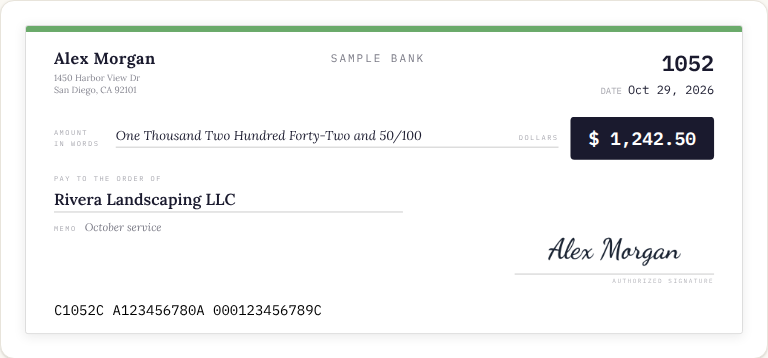
What the person you pay opens from your link: the check in the Clean design, verified, with Endorse and Share under it.
The chip on the face
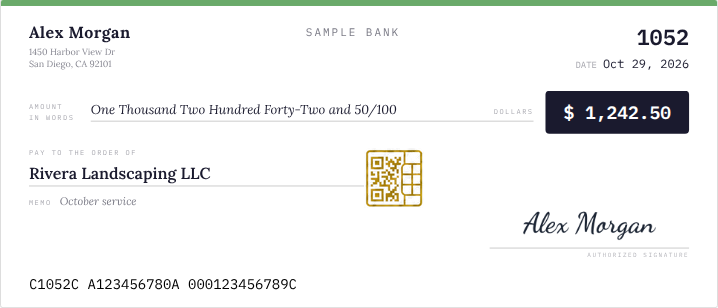
Every check carries the gold chip beside the signature. When you sign, it becomes the check's own code: one of three key pieces, plus the verifier's address.
On paper, the same code
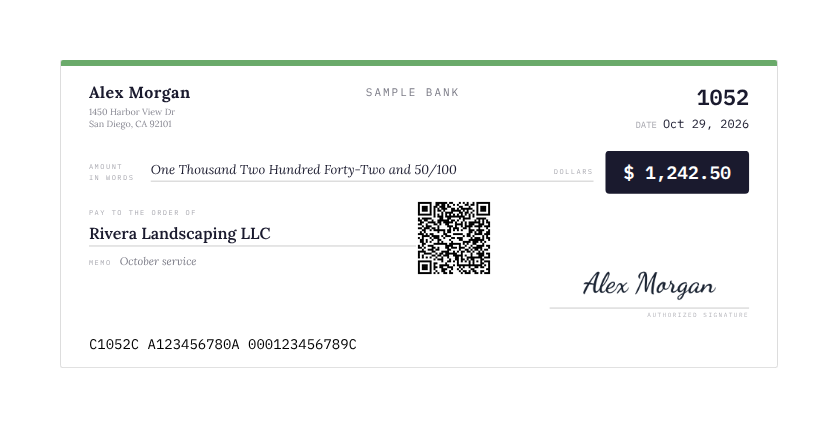
Printed on plain paper, the chip prints as a plain black code at the same spot. Your bank deposits the check like any other; anyone can scan the code.
The scan: KeyHalve's verification page

This is the real page a scan opens at verify.keyhalve.com: "You verified this document." On the left, the sealed facts (payee, amount, date, who issued it); on the right, the proof: Authentic, the fingerprint matched, the rail's signature bound, the three-piece split named, and the line that matters: verified in your browser, KeyHalve never received the key or the contents. A CheckBooks.ai check opens the same page with its own facts.
What happens behind that page
The code's piece stays in the phone; checkbooks.ai hands over the locked facts and one piece; the KeyHalve rail, which never sees the check, hands over the last piece and its signature. The seal opens only in the reader's hands.
The check shown is the app's own sample in the Clean design; the printed sheet stands in until the real PDF render lands; the verification page shows the rail's public sample document.
What is on the check
A code, on every check
Printed on the paper or shown with the check you send as a link. It carries two things: the address of the verifier page, and one of the three pieces of the key that opens the check's seal. On its own, it reveals nothing.
The facts it protects
The payee, the amount in numbers and words, the date, the check number, the memo, who issued it, the bank's name and the last four digits of its routing number. Never your account number.
The seal, in plain words
1. The facts are locked
A check's facts are locked with a key that belongs to this check alone. The locked facts and their fingerprint are kept at CheckBooks.ai.
2. The key is cut in three
One piece rides in the code on the check, and CheckBooks.ai keeps an encrypted copy of it so the check's PDF can be made again. One stays at CheckBooks.ai. One is kept by KeyHalve, an independent rail. All three are needed: no single party, not CheckBooks.ai, not KeyHalve, can open or forge a seal alone.
3. KeyHalve never sees the check
The rail keeps its piece and co-signs the fingerprint of the locked facts, so any change shows. It never receives the check, your name, the payee or your bank account numbers. It is blind by design: a blind rail, with the smart parts at the edges.
How a scan verifies
- Scan the code with any phone camera. It opens the verifier page at verify.keyhalve.com.
- The page fetches the locked facts and CheckBooks.ai's piece from checkbooks.ai, and the rail's piece from KeyHalve. The code's own piece never leaves the phone.
- In the phone's browser the three pieces become the key, the seal opens, and the fingerprint and KeyHalve's signature are checked.
- The answer: Verified, with the check's facts as issued. Altered if one character differs. Voided if the owner cancelled the check. A warning if the code itself is a forgery.
Free, with no account, for anyone, every time.
Without the code
At checkbooks.ai/verify, type the check number, the amount and the payee, or upload a photo of the check. The answer says whether a check with those facts was issued and secured here.
If a check is voided
The moment the owner voids a check, its seal is revoked at the rail and CheckBooks.ai stops serving its pieces. A scan a second later says Voided. Verification is always live; nothing is cached.
The paper and the bank
Print on plain paper; your bank deposits it like any other check and reads it as an image. The seal does not depend on the paper: a printed check, a check sent as a link and a check deposited from a screen all verify the same way.
What we never do
CheckBooks.ai holds no money. KeyHalve stores no checks. Your account numbers never reach the rail. A seal is good for 180 days, the time a check is good. The seal proves what was issued; your bank, not the seal, moves the money.